<?xml version="1.0" encoding="utf-8"?><feed xmlns="http://www.w3.org/2005/Atom" ><generator uri="https://jekyllrb.com/" version="4.2.2">Jekyll</generator><link href="https://ligature.ca/feed.xml" rel="self" type="application/atom+xml" /><link href="https://ligature.ca/" rel="alternate" type="text/html" /><updated>2024-09-24T03:31:42-05:00</updated><id>https://ligature.ca/feed.xml</id><title type="html">ligature.ca</title><subtitle>Kento Lauzon&apos;s mildly interesting tech projects</subtitle><entry><title type="html">Sid Meier’s Slack Bot – Engineering Civilization 5 pitboss turn notifications</title><link href="https://ligature.ca/the%20lab/2021/11/13/Civilization-5-pitboss-turn-notifications.html" rel="alternate" type="text/html" title="Sid Meier’s Slack Bot – Engineering Civilization 5 pitboss turn notifications" /><published>2021-11-13T00:00:00-06:00</published><updated>2021-11-13T00:00:00-06:00</updated><id>https://ligature.ca/the%20lab/2021/11/13/Civilization%205%20pitboss%20turn%20notifications</id><content type="html" xml:base="https://ligature.ca/the%20lab/2021/11/13/Civilization-5-pitboss-turn-notifications.html"><![CDATA[<p><img src="/assets/2021-11-13/screenshot.png" alt="screenshot" /><br />
<em>Sid Meier’s Slack Bot – Spamming Slack channels since 2020.</em></p>

<p>While Civilization 5 games can be loads of fun with the pitboss
setting, it usually gets pretty difficult to keep track of each
other’s turn times, even with a consistent turn timer. A Slack bot
seems like a compelling solution, but how exactly are we supposed to
hook into the game state?</p>

<h1 id="sid-meiers-lua-engine--gods-and-scripts">Sid Meier’s Lua Engine – Gods and Scripts</h1>
<p>Fortunately, Civilization 5 includes various tools for modders,
including a Lua scripting engine. It also includes the FireTuner, a
nice debugging tool. By looking around in the FireTuner, I was able to
find the <code class="language-plaintext highlighter-rouge">Game</code> and <code class="language-plaintext highlighter-rouge">Players</code> global variables that hold high-level
information about the game. This includes the current turn number,
each player’s name, civilization, etc. Sounds exactly like what we are
looking for! From there, assembling a usable data format is trivial.</p>

<div class="language-json highlighter-rouge"><div class="highlight"><pre class="highlight"><code><span class="p">{</span><span class="w">
    </span><span class="nl">"gameTurn"</span><span class="p">:</span><span class="w"> </span><span class="mi">118</span><span class="p">,</span><span class="w">
    </span><span class="nl">"players"</span><span class="p">:</span><span class="w"> </span><span class="p">[</span><span class="w">
        </span><span class="p">{</span><span class="w">
            </span><span class="nl">"id"</span><span class="p">:</span><span class="w"> </span><span class="mi">1</span><span class="p">,</span><span class="w">
            </span><span class="nl">"nickName"</span><span class="p">:</span><span class="w"> </span><span class="s2">"Atreides"</span><span class="p">,</span><span class="w">
            </span><span class="nl">"civilization"</span><span class="p">:</span><span class="w"> </span><span class="s2">"Morocco"</span><span class="p">,</span><span class="w">
            </span><span class="nl">"isTurnComplete"</span><span class="p">:</span><span class="w"> </span><span class="kc">false</span><span class="p">,</span><span class="w">
            </span><span class="nl">"isOnline"</span><span class="p">:</span><span class="w"> </span><span class="kc">true</span><span class="p">,</span><span class="w">
            </span><span class="nl">"isAlive"</span><span class="p">:</span><span class="w"> </span><span class="kc">true</span><span class="w">
        </span><span class="p">},</span><span class="w">
        </span><span class="p">{</span><span class="w">
            </span><span class="nl">"id"</span><span class="p">:</span><span class="w"> </span><span class="mi">2</span><span class="p">,</span><span class="w">
            </span><span class="nl">"nickName"</span><span class="p">:</span><span class="w"> </span><span class="s2">"bobby_joe"</span><span class="p">,</span><span class="w">
            </span><span class="nl">"civilization"</span><span class="p">:</span><span class="w"> </span><span class="s2">"America"</span><span class="p">,</span><span class="w">
            </span><span class="nl">"isTurnComplete"</span><span class="p">:</span><span class="w"> </span><span class="kc">true</span><span class="p">,</span><span class="w">
            </span><span class="nl">"isOnline"</span><span class="p">:</span><span class="w"> </span><span class="kc">false</span><span class="p">,</span><span class="w">
            </span><span class="nl">"isAlive"</span><span class="p">:</span><span class="w"> </span><span class="kc">true</span><span class="w">
        </span><span class="p">}</span><span class="w">
     </span><span class="p">]</span><span class="w">
</span><span class="p">}</span><span class="w">
</span></code></pre></div></div>

<p>Even better, the SDK has an <code class="language-plaintext highlighter-rouge">Events</code> API to which we can subscribe in
order have a callback to our function without having to maintain a
complicated application lifecycle. Namely, events like
<code class="language-plaintext highlighter-rouge">RemotePlayerTurnEnd</code>, <code class="language-plaintext highlighter-rouge">RemotePlayerTurnStart</code>,
<code class="language-plaintext highlighter-rouge">MultiplayerGamePlayerUpdated</code> will allow us to be notified of
anything that might affect our game state.</p>

<h1 id="sid-meiers-mods--multiplayer-shenanigans">Sid Meier’s Mods – Multiplayer Shenanigans</h1>
<p>While packaging our script as a mod sounds like the cleanest solution,
Civilization 5 nominally does not support loading mods in multiplayer
games. Instead of having to apply another hack on top of the one we
are creating just to allow multiplayer mods, there exists a simpler
route equally as <em>hacky</em>. Since we only need to run our script once to
load our listener into memory, we can inconspicuously insert its content into
one of Civilization 5’s existing UI scripts, which are fortunately
saved as plain Lua. That way, our function is always loaded, and the
game is none the wiser.</p>

<p>To that end, I found <code class="language-plaintext highlighter-rouge">TopPanel.lua</code> to be a suitable home for our
script, since it happens to be loaded even for spectators.</p>

<p><img src="/assets/2021-11-13/toppanel.jpg" alt="TopPanel" /><br />
<em>TopPanel.lua</em></p>

<p>As a bonus, we can easily keep the modified code on the server side,
since it does not <em>technically</em> modify the game in any way.</p>

<h1 id="sid-meiers-web-hooks--an-unfortunate-workaround">Sid Meier’s Web Hooks – An Unfortunate Workaround</h1>
<p>While it would be nice for our Lua function to directly make HTTP
requests for the Slack notifications, the Lua engine supplied with
Civilization 5 is heavily constrained, as it should be. External
libraries, such as ones that would establish external connections of
any kind, are not importable. This leaves one possible avenue for
smuggling information out of the Lua engine: the dreaded console
output.</p>

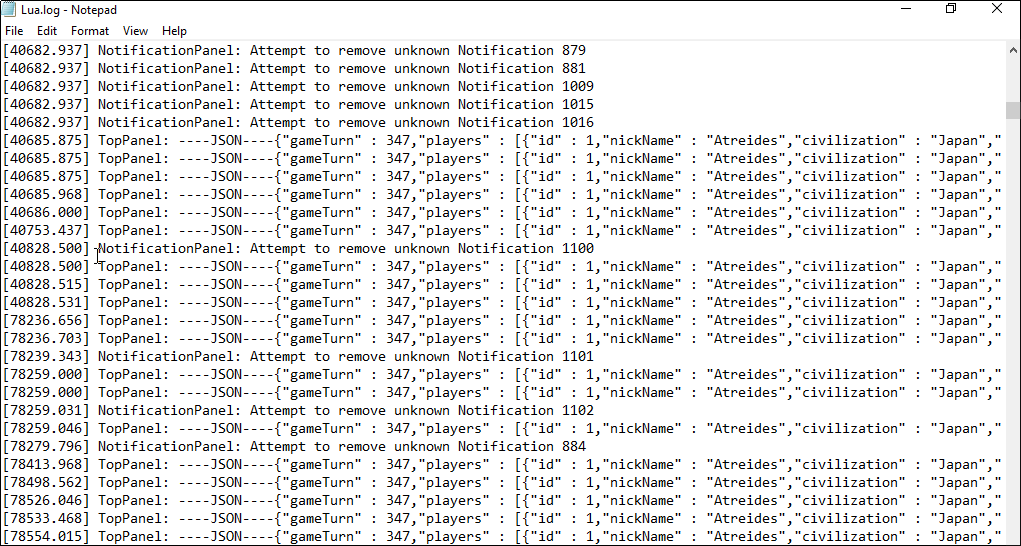
<p><img src="/assets/2021-11-13/log.png" alt="TopPanel" /><br />
<em>The dreaded debug console output.</em></p>

<p>Using some clever formatting and a Powershell script to watch the
content of the debug console, we are able to send out HTTP requests
whenever our function prints out a line.</p>

<h1 id="sid-meiers-slack-bot--holding-players-accountable">Sid Meier’s Slack Bot – Holding Players Accountable</h1>
<p>Making the Slack bot itself is pretty straightforward. It is a
matter of creating an app integration, and sending out notifications
on a specific channel. We now have everything to prevent players from
forgetting to play their turn!</p>

<p><img src="/assets/2021-11-13/screenshot.png" alt="screenshot" /><br />
<em>The end result.</em></p>]]></content><author><name>Kento A. Lauzon</name></author><category term="The Lab" /><category term="civ5" /><category term="slack" /><summary type="html"><![CDATA[Sid Meier’s Slack Bot – Spamming Slack channels since 2020.]]></summary></entry><entry><title type="html">Building a VPN appliance for network-wide routing using advanced DHCP settings</title><link href="https://ligature.ca/the%20lab/2021/11/05/Advanced-DHCP-settings-for-selectively-routing-connections-through-a-VPN.html" rel="alternate" type="text/html" title="Building a VPN appliance for network-wide routing using advanced DHCP settings" /><published>2021-11-05T00:00:00-05:00</published><updated>2021-11-05T00:00:00-05:00</updated><id>https://ligature.ca/the%20lab/2021/11/05/Advanced%20DHCP%20settings%20for%20selectively%20routing%20connections%20through%20a%20VPN</id><content type="html" xml:base="https://ligature.ca/the%20lab/2021/11/05/Advanced-DHCP-settings-for-selectively-routing-connections-through-a-VPN.html"><![CDATA[<p>Self-hosting applications behind a VPN is great for simplicity and
security. However, applying the VPN configuration to every single
device on a remote network quickly becomes cumbersome. Instead, I
wanted something to allow servers on the corporate network to be
reachable across the whole home network from a single configuration
point.</p>

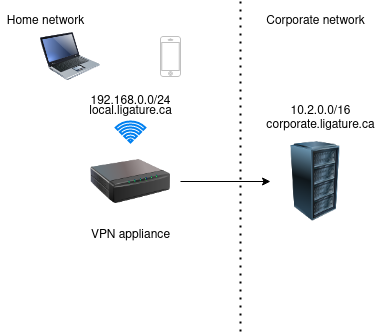
<p><img src="/assets/2021-11-05/diagram.png" alt="network-diagram" /><br />
<em>Remote site network architecture</em></p>

<p>Using a set of advanced DHCP options, it is possible to provide
additional static routes to every client for the VPN, while still preferring
the default ISP route for everything else. The relevant DHCP options
are <code class="language-plaintext highlighter-rouge">router</code>(3), <code class="language-plaintext highlighter-rouge">dns-server</code>(6) and <code class="language-plaintext highlighter-rouge">static-routes</code> (121).</p>

<p>The router (3) option specifies the default route for traffic. Since the
DHCP server is hosted on a separate machine, we have to manually
specify it to point to the ISP router.</p>

<p>The dns-server (6) option indicates that the separate DHCP server
should be queried regarding any DNS request. This allows us to easily
bypass the ISP router to use our own rules.</p>

<p>Finally, the static-routes (121) option specifies static routes that
clients should use, by order of preference. In our case, we should
route requests to 10.2.0.0/16 through the DHCP/VPN server
(192.168.0.2) and everything else (0.0.0.0) through the default ISP
router (192.168.0.1). This is crucial to keep the regular traffic from
being forced through the VPN link, which would result in increased latency.</p>

<p>Here are the rules in dnsmasq.conf format.</p>

<div class="language-plaintext highlighter-rouge"><div class="highlight"><pre class="highlight"><code>server=/corporate.ligature.ca/10.2.0.2 # Upstream DNS server for the corporate network

dhcp-option=option:router,192.168.0.1 # The real router (ISP) is at 192.168.0.1
dhcp-option=option:dns-server,192.168.0.2 # *I* am the DNS server for this network
dhcp-option=121,10.2.0.0/16,192.168.0.2,0.0.0.0/0,192.168.0.1 # Route 10.2.0.0/16 through 192.168.0.2, everything else through 192.168.0.1
</code></pre></div></div>

<p>See also the <a href="/assets/2021-11-05/dnsmasq.conf">full dnsmasq.conf</a>.</p>]]></content><author><name>Kento A. Lauzon</name></author><category term="The Lab" /><category term="vpn" /><category term="dhcp" /><category term="dnsmasq" /><category term="dns" /><summary type="html"><![CDATA[Self-hosting applications behind a VPN is great for simplicity and security. However, applying the VPN configuration to every single device on a remote network quickly becomes cumbersome. Instead, I wanted something to allow servers on the corporate network to be reachable across the whole home network from a single configuration point.]]></summary></entry><entry><title type="html">Writing code using a foot pedal for the ultimate ergonomic setup</title><link href="https://ligature.ca/the%20lab/2021/10/29/Writing-code-using-a-foot-pedal.html" rel="alternate" type="text/html" title="Writing code using a foot pedal for the ultimate ergonomic setup" /><published>2021-10-29T00:00:00-05:00</published><updated>2021-10-29T00:00:00-05:00</updated><id>https://ligature.ca/the%20lab/2021/10/29/Writing%20code%20using%20a%20foot%20pedal</id><content type="html" xml:base="https://ligature.ca/the%20lab/2021/10/29/Writing-code-using-a-foot-pedal.html"><![CDATA[<p><img src="/assets/2021-10-29/demo.gif" alt="demo.gif" width="300" /><br />
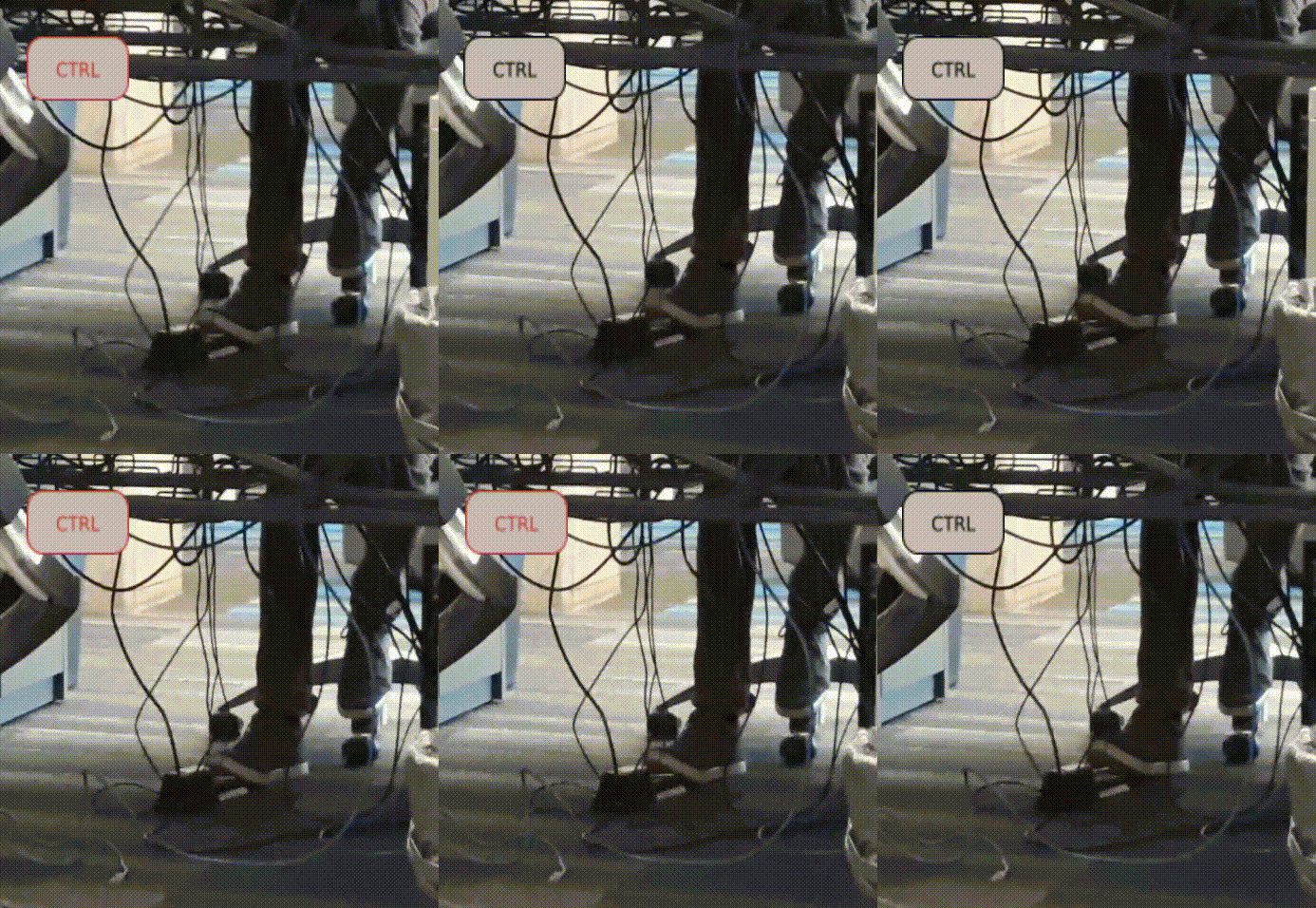
<em>Introducing the Pedal Master™</em></p>

<p>Having been accustomed to the default emacs keybindings for a few years, I
have been finding myself to be holding the control key much more than
what I would consider “healthy”. Of course, swapping the caps lock key
for a closer ctrl does help, but this solution left me looking for
something even more comfortable. (Those C-n, C-p, C-b, C-f certainly
do somthing to your wrists!) So what better then, than recreating the
meme of having to use your feet to operate the keyboard!</p>

<h1 id="the-pedals">The pedals</h1>
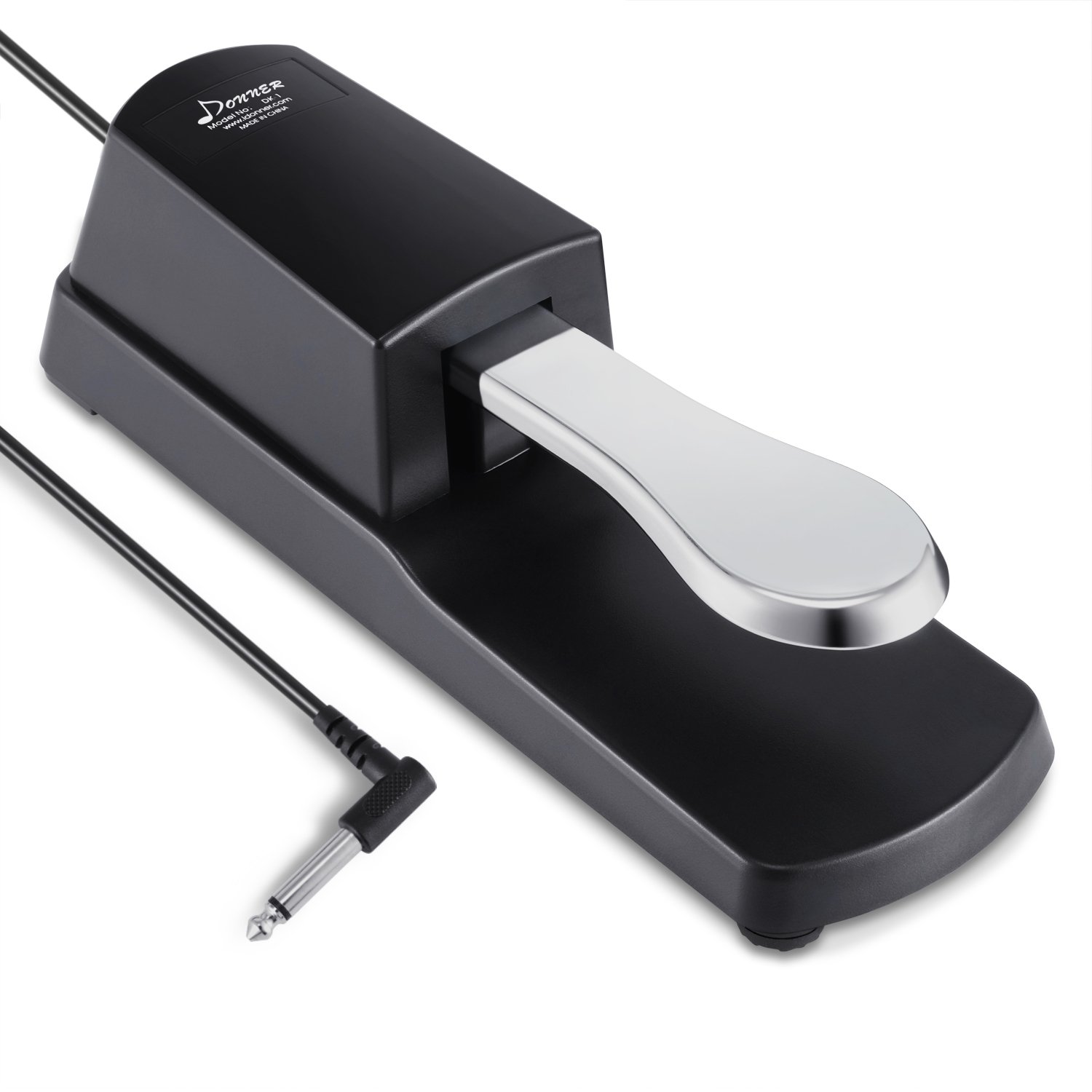
<p>My goal was to design an Arduino-based controller that could read
inputs from affordable pedals, while still providing a great feel and
response. For this, digital piano pedals, the ones readily available
in music shops, fit the bill perfectly. These connect to a
keyboard/synthesizer using a 1/4” audio-style connector, and simply
act as a momentary switch, which ought to be easy to read using an
arduino.</p>

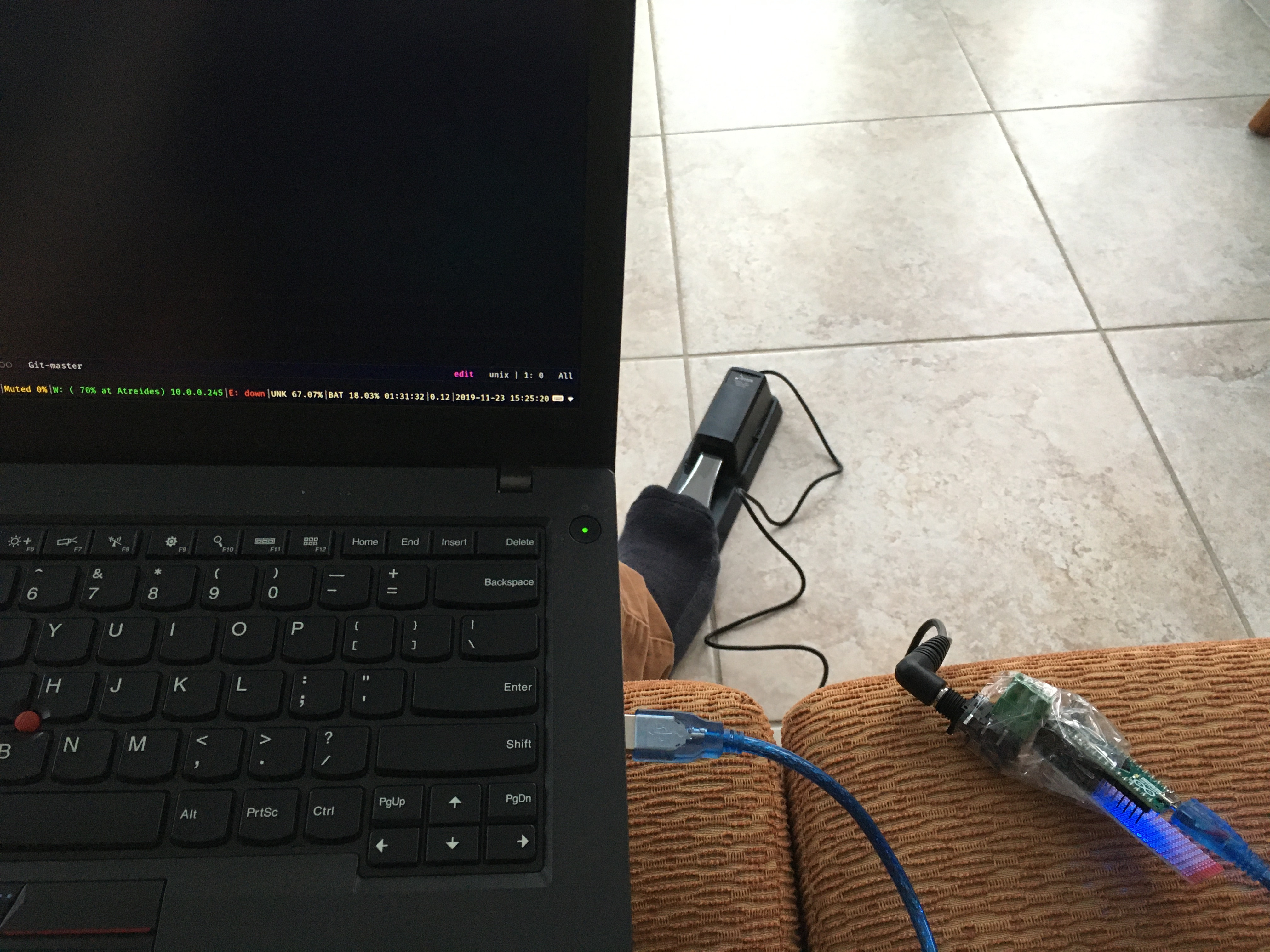
<p><img src="/assets/2021-10-29/pedal.jpg" alt="A digital pedal" width="250" /><br />
<em>A digital piano pedal</em></p>

<h1 id="introducing-the-pedal-master">Introducing the Pedal Master™</h1>
<p>The first prototype was certainly less than stellar. It nonetheless
allowed me to gauge whether such a device would end up usable at
all. I haphazardly stuck together an Arduino Micro and an Amphenol
Audio jack connector with tape, and mapped the key to Ctrl. To my
great relief, the gesture became natural after less than a week of
forcibly disabling all other means of operating the Ctrl
key. Furthermore, the reduced strain on my left wrist certainly
improved my overall comfort. 
<img src="/assets/2021-10-29/pedalmaster_v1.jpg" alt="Pedal master v1" /><br />
<em>Pedal Master v1</em></p>

<h1 id="pedal-master-v2---the-sequel">Pedal Master V2 - The Sequel</h1>
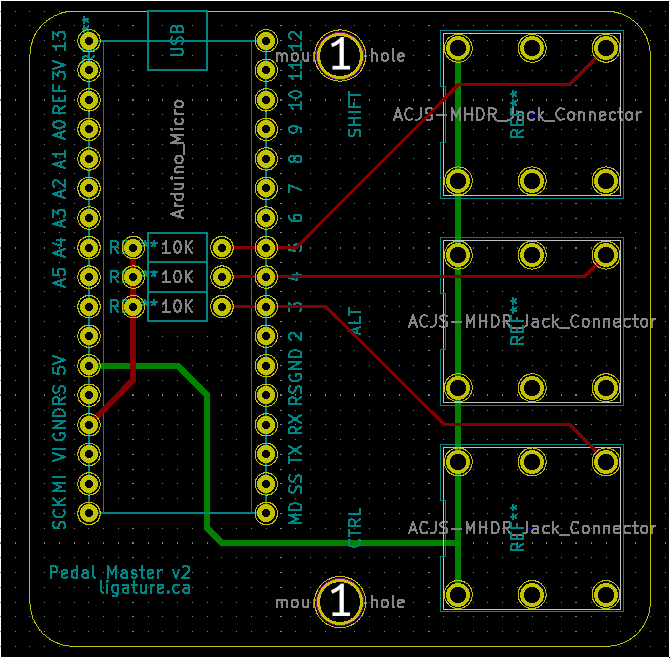
<p><img src="/assets/2021-10-29/schematic.png" alt="Pedal master v2 design schematic" width="250" /></p>

<p>Now, onto the serious stuff. Having proved that such a device would be
valuable to my daily work, I set out to create a new and improved
version of the Pedal Master™, one that I would not have to be ashamed
of bringing to the office.</p>

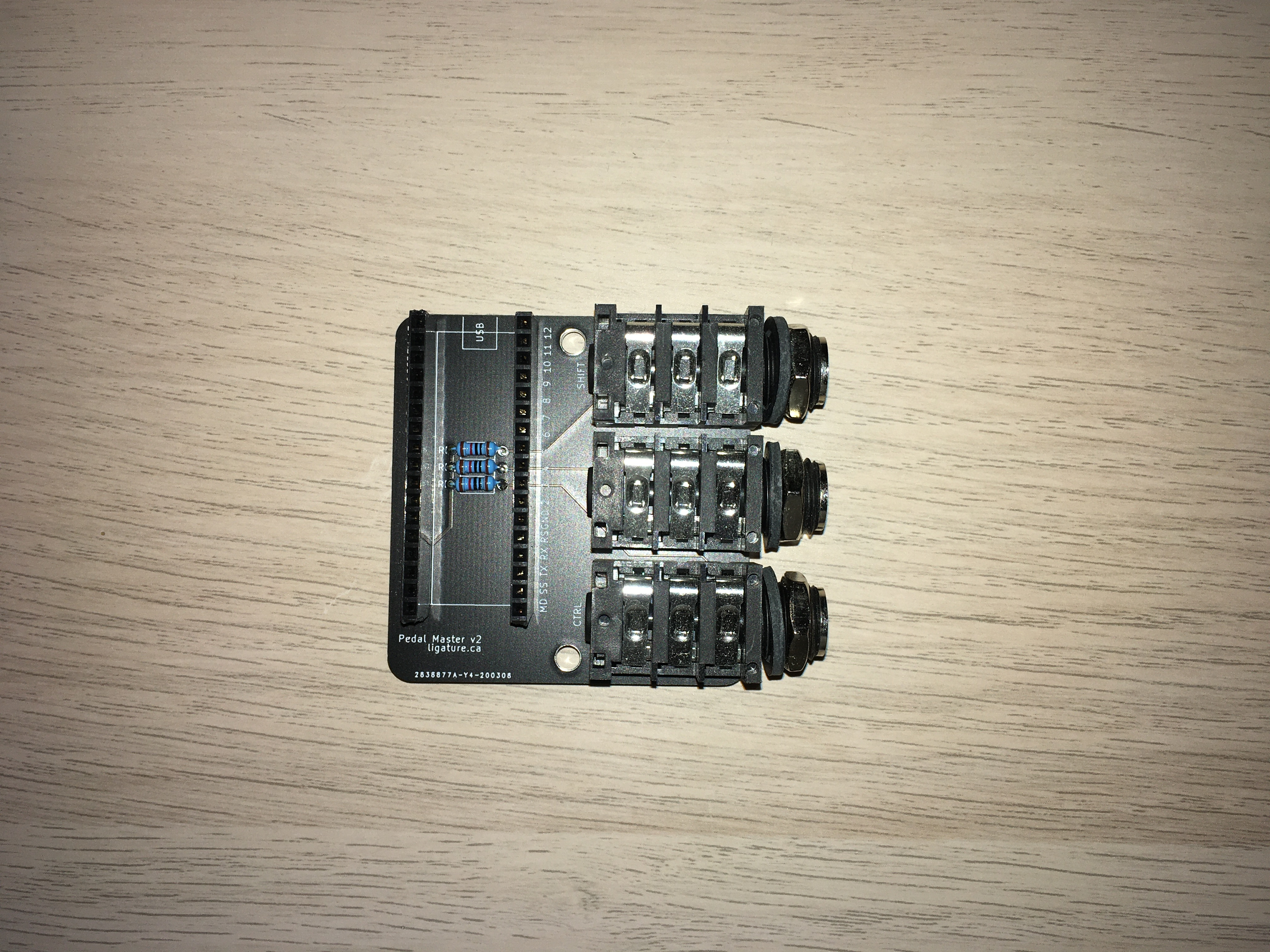
<p>Using KiCad, I was able to design my first ever PCB, and send it to a
factory in China for production. I scaled the design by allowing to
use of up to three pedals simultaneously. I also added support for
inverted pedals (mostly Yamaha ones), which greatly increases
compatibility.</p>

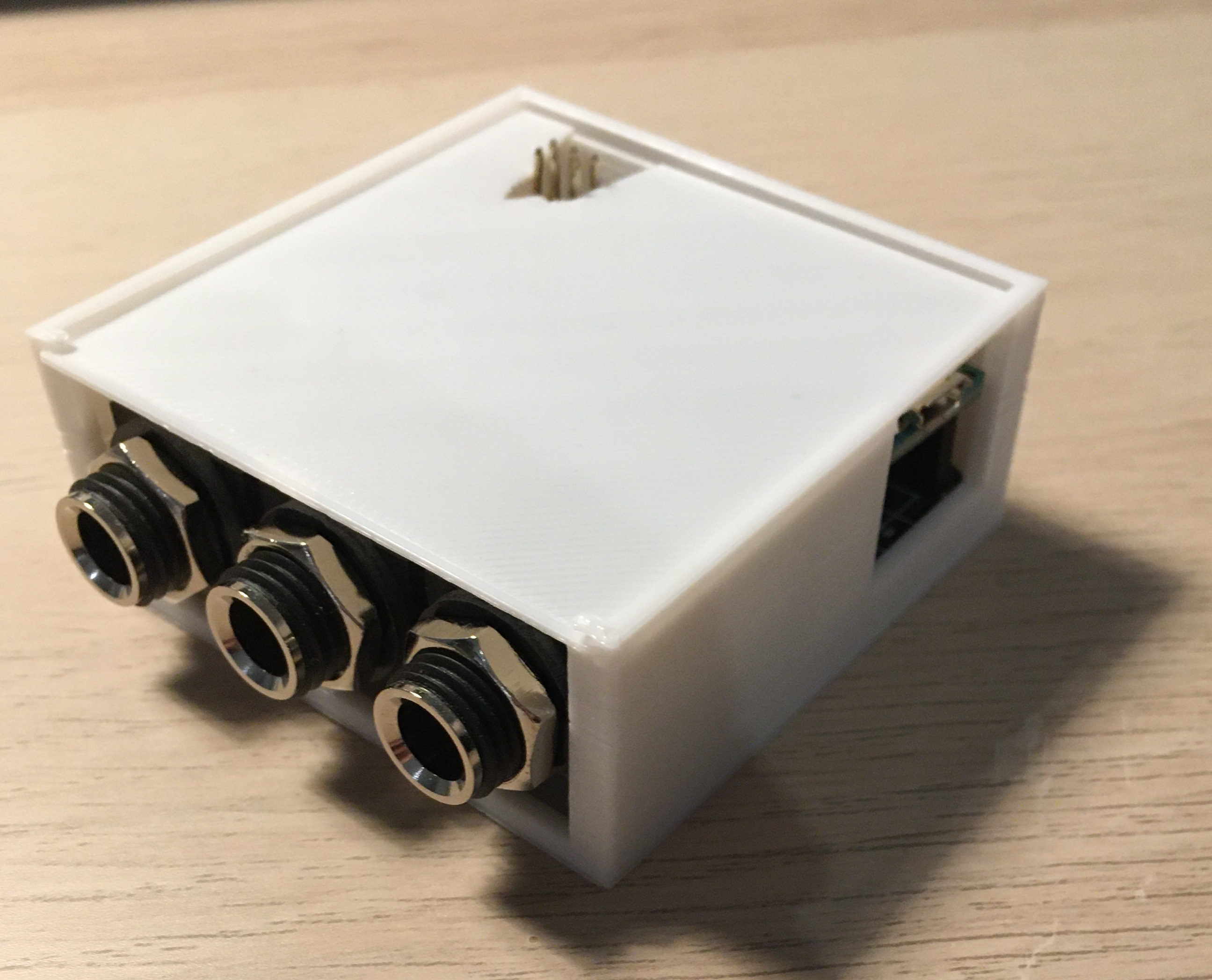
<p>Finally, using Fusion 360 and a 3D printer, I designed and printed a
simple case to house the device. The assembled part is now certainly
nothing to be ashamed of!</p>

<p><img src="/assets/2021-10-29/pedalmaster_v2.jpg" alt="The new and improved Pedal
master" width="250" /><br />
<em>The new and improved Pedal Master</em></p>

<p><img src="/assets/2021-10-29/case.jpg" alt="With a case on" width="250" /><br />
<em>Now with a case!</em></p>

<h1 id="final-thoughts">Final thoughts</h1>
<p>The goal of providing a more comfortable coding experience has
certainly been accomplished. Over an extended period of use, I can
tell that wrist discomfort has certainly decreased in my case,
although it certainly does not constitute medical advice. Sure, the
same could probably have been achieved by switching to a more
wrist-friendly keymap like the vim bindings, but what’s the fun in
that?</p>

<p>As an added bonus, constantly resting a foot on the pedal makes me,
perhaps unconsciously, adopt a very straight posture, taking me back
to my piano lesson days.</p>

<p>For the daring folks who might want to try this at home, I have
compiled all the assembly instruction and fabrication files on my
<a href="https://github.com/keotl/pedal-master">Github</a>.</p>

<h1 id="random-bits">Random bits</h1>
<p>I would like to be able to say that no foot pedal was harmed in the
making of this blog post, but I could not be honest in saying
so. After a few weeks of use, the first off-brand pedal I bought on
Amazon failed with a loud cracking sound. The pedal afficionado that I
now am can tell that its design was fundamentally flawed. Though the
outer part and spring were metal, the resting point was made of thin
flimsy plastic, unfit for extended use. I have since moved on to more
reputable brands.
<img src="/assets/2021-10-29/rip-pedal.jpg" alt="Rest in peace, cheapo pedal" width="250" /><br />
<em>Rest in peace, cheapo pedal</em></p>]]></content><author><name>Kento A. Lauzon</name></author><category term="The Lab" /><category term="pedal" /><category term="arduino" /><category term="pcb" /><summary type="html"><![CDATA[Introducing the Pedal Master™]]></summary></entry><entry><title type="html">Using ffserver to transcode live radio and broadcast to unsupported clients (Chromecast, .m3u8)</title><link href="https://ligature.ca/uncategorized/2020/07/05/using-ffserver-to-transcode-live-radio-and-broadcast-to-unsupported-clients-chromecast-m3u8.html" rel="alternate" type="text/html" title="Using ffserver to transcode live radio and broadcast to unsupported clients (Chromecast, .m3u8)" /><published>2020-07-05T11:07:09-05:00</published><updated>2020-07-05T11:07:09-05:00</updated><id>https://ligature.ca/uncategorized/2020/07/05/using-ffserver-to-transcode-live-radio-and-broadcast-to-unsupported-clients-chromecast-m3u8</id><content type="html" xml:base="https://ligature.ca/uncategorized/2020/07/05/using-ffserver-to-transcode-live-radio-and-broadcast-to-unsupported-clients-chromecast-m3u8.html"><![CDATA[<p><!-- wp:paragraph --></p>
<p>Google Chromecast can be easily configured to play audio or video files over HTTP. Using <a href="https://github.com/home-assistant-libs/pychromecast">PyChromecast</a>, one can play a publicly-accessible audio file by providing its URL.</p>
<p><code>media_controller.play_media("http://example.com/audio.mp3", 'audio/mp3')</code></p>
<p><!-- /wp:paragraph --><br />
<!-- wp:paragraph --></p>
<p>However, things start to go wrong when trying to play HLS streams, which have the .<strong>m3u8</strong> file extension. </p>
<p><!-- /wp:paragraph --><br />
<!-- wp:heading --></p>
<h2>Enter ffserver</h2>
<p><!-- /wp:heading --><br />
<!-- wp:paragraph --></p>
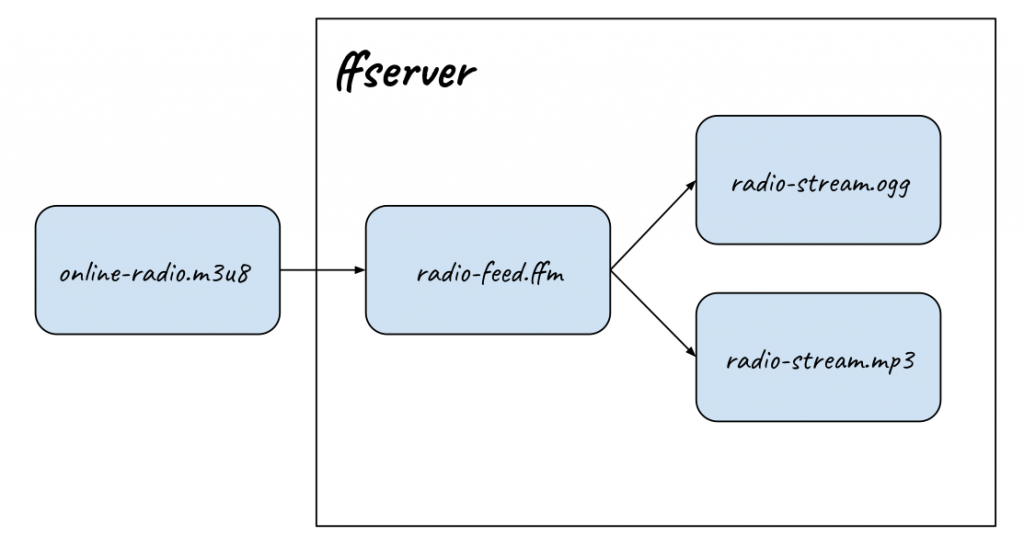
<p>ffserver is (or rather <a href="https://trac.ffmpeg.org/wiki/ffserver">was</a>) an easy way to take a input <strong>feed</strong> and transcode it to one or may output <strong>streams</strong> while being provided with the ffmpeg binaries. Since ffmpeg can already decode .m3u8 HLS streams, it can be used directly as an input feed to ffserver. Given the right configuration, on can then expose this feed as a streaming mp3/ogg/aac file which can be understood by the Chromecast, or any other dumb player which can play a file from an HTTP stream.</p>
<p><!-- /wp:paragraph --><br />
<!-- wp:image {"id":179,"sizeSlug":"large"} --></p>
<figure class="wp-block-image size-large"><img src="/wp-content/uploads/2020/07/ffserver-1024x547.png" alt="" class="wp-image-179"/><br />
<figcaption>ffserver serves ordinary audio streams (.ogg, .mp3, ...) over HTTP.</figcaption>
</figure>
<p><!-- /wp:image --><br />
<!-- wp:paragraph {"textColor":"very-dark-gray","backgroundColor":"very-light-gray"} --></p>
<p class="has-text-color has-background has-very-dark-gray-color has-very-light-gray-background-color">N.B. ffserver has been officially deprecated in  2016 and subsequently dropped from ffmpeg binaries in 2018. Ubuntu 18.04 repositories serve ffmpeg 3.4.6 which <strong>still includes</strong> ffserver.  </p>
<p><!-- /wp:paragraph --><br />
<!-- wp:heading {"level":3} --></p>
<h3>Configuration</h3>
<p><!-- /wp:heading --><br />
<!-- wp:paragraph --></p>
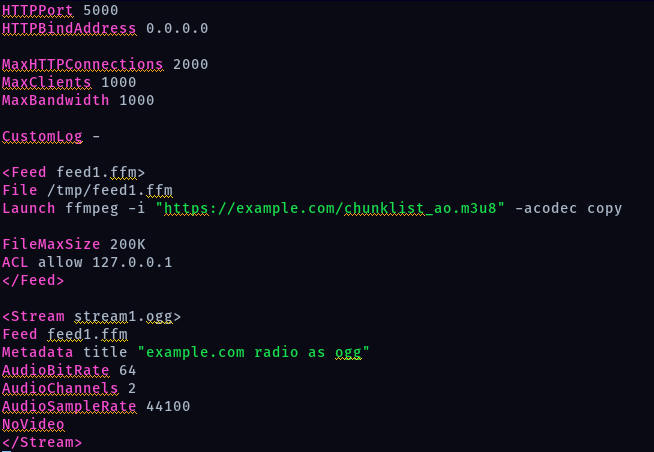
<p>ffserver's configuration itself is pretty straightforward. We both define an input feed and an output stream. Multiple streams can be defined for the same feed.</p>
<p><!-- /wp:paragraph --><br />
<!-- wp:image {"id":178,"sizeSlug":"large"} --></p>
<figure class="wp-block-image size-large"><img src="/wp-content/uploads/2020/07/ffserver.conf_.png" alt="" class="wp-image-178"/><br />
<figcaption>/etc/ffserver.conf<br /> See <a href="https://github.com/keotl/ffserver-live-radio-mirror-example">https://github.com/keotl/ffserver-live-radio-mirror-example</a> for pastable code and a Dockerfile!</figcaption>
</figure>
<p><!-- /wp:image --><br />
<!-- wp:paragraph --></p>
<p>Running ffserver should now start an HTTP server, which serves our <strong>stream1.ogg</strong> on <code>http://localhost:5000/stream1.ogg</code> .</p>
<p><!-- /wp:paragraph --><br />
<!-- wp:paragraph --></p>
<p>See this <a href="https://github.com/keotl/ffserver-live-radio-mirror-example">GitHub Repository</a> for a complete working example.</p>
<p><!-- /wp:paragraph --></p>]]></content><author><name>{&quot;display_name&quot;=&gt;&quot;Kento A. Lauzon&quot;, &quot;login&quot;=&gt;&quot;ligature_bdxbpw&quot;, &quot;email&quot;=&gt;&quot;kento.lauzon@ligature.ca&quot;, &quot;url&quot;=&gt;&quot;&quot;}</name><email>kento.lauzon@ligature.ca</email></author><category term="Uncategorized" /><summary type="html"><![CDATA[Google Chromecast can be easily configured to play audio or video files over HTTP. Using PyChromecast, one can play a publicly-accessible audio file by providing its URL. media_controller.play_media("http://example.com/audio.mp3", 'audio/mp3') However, things start to go wrong when trying to play HLS streams, which have the .m3u8 file extension. Enter ffserver ffserver is (or rather was) an easy way to take a input feed and transcode it to one or may output streams while being provided with the ffmpeg binaries. Since ffmpeg can already decode .m3u8 HLS streams, it can be used directly as an input feed to ffserver. Given the right configuration, on can then expose this feed as a streaming mp3/ogg/aac file which can be understood by the Chromecast, or any other dumb player which can play a file from an HTTP stream. ffserver serves ordinary audio streams (.ogg, .mp3, ...) over HTTP. N.B. ffserver has been officially deprecated in 2016 and subsequently dropped from ffmpeg binaries in 2018. Ubuntu 18.04 repositories serve ffmpeg 3.4.6 which still includes ffserver. Configuration ffserver's configuration itself is pretty straightforward. We both define an input feed and an output stream. Multiple streams can be defined for the same feed. /etc/ffserver.conf See https://github.com/keotl/ffserver-live-radio-mirror-example for pastable code and a Dockerfile! Running ffserver should now start an HTTP server, which serves our stream1.ogg on http://localhost:5000/stream1.ogg . See this GitHub Repository for a complete working example.]]></summary></entry><entry><title type="html">Understanding the HTML Audio Element Buffered Regions</title><link href="https://ligature.ca/web%20stuff/2018/06/17/understanding-the-html-audio-element-buffered-regions.html" rel="alternate" type="text/html" title="Understanding the HTML Audio Element Buffered Regions" /><published>2018-06-17T13:39:25-05:00</published><updated>2018-06-17T13:39:25-05:00</updated><id>https://ligature.ca/web%20stuff/2018/06/17/understanding-the-html-audio-element-buffered-regions</id><content type="html" xml:base="https://ligature.ca/web%20stuff/2018/06/17/understanding-the-html-audio-element-buffered-regions.html"><![CDATA[<p><img class="wp-image-143 aligncenter" src="/wp-content/uploads/2018/06/custom-html-audio-player.png" alt="" width="334" height="77" /><br />
The HTML audio element exposes multiple properties and methods which prove to be useful for making a reactive web music player. In addition to the usual play/pause controls, the <audio> tag has a&nbsp;<em>currentTime</em>, a&nbsp;<em>duration</em>, and a&nbsp;<em>buffered&nbsp;</em>attributes which can all be used to get the playing media state in real time using a bit of JavaScript code.</p>
<h2><em>currentTime</em>&nbsp;and&nbsp;<em>duration</em><img class="size-full wp-image-145 alignright" style="font-size: 1rem;" src="/wp-content/uploads/2018/06/formatted-duration.png" alt="" width="119" height="49" /></h2>
<p>The&nbsp;<em>currentTime</em> and&nbsp;<em>duration</em> attributes are pretty straightforward.&nbsp;<em>currentTime</em> returns the playback position from the audio file start, in seconds, as a float. Similarly,&nbsp;<em>duration</em> is a float corresponding to the total media length. One can then simply convert to a more natural time format using a bit of formatting code.<br />
[code lang="javascript"]<br />
export function formatDuration(floatSeconds) {<br />
  const durationMillis = floatSeconds * 1000;<br />
  const timeInSeconds = Math.floor(durationMillis / 1000);<br />
  const minutes = Math.floor(timeInSeconds / 60);<br />
  const seconds = timeInSeconds - (minutes * 60);<br />
  const formattedSeconds = seconds > 9 ? `${seconds}` : `0${seconds}`;<br />
  return `${minutes}:${formattedSeconds}`;<br />
}<br />
[/code]</p>
<h2><em>buffered</em> regions</h2>
<p>The HTML audio element internally uses multiple&nbsp;<em>buffered</em> regions, which live independently. Each buffered region start and stop times can be accessed using the following JavaScript lines.<br />
audioelement.buffered.start(<buffered_region_id>)<br />
audioelement.buffered.end(<buffered_region_id>)<br />
<img class="size-full wp-image-146 aligncenter" src="/wp-content/uploads/2018/06/html-audio-buffered-regions.png" alt="" width="1355" height="898" /><br />
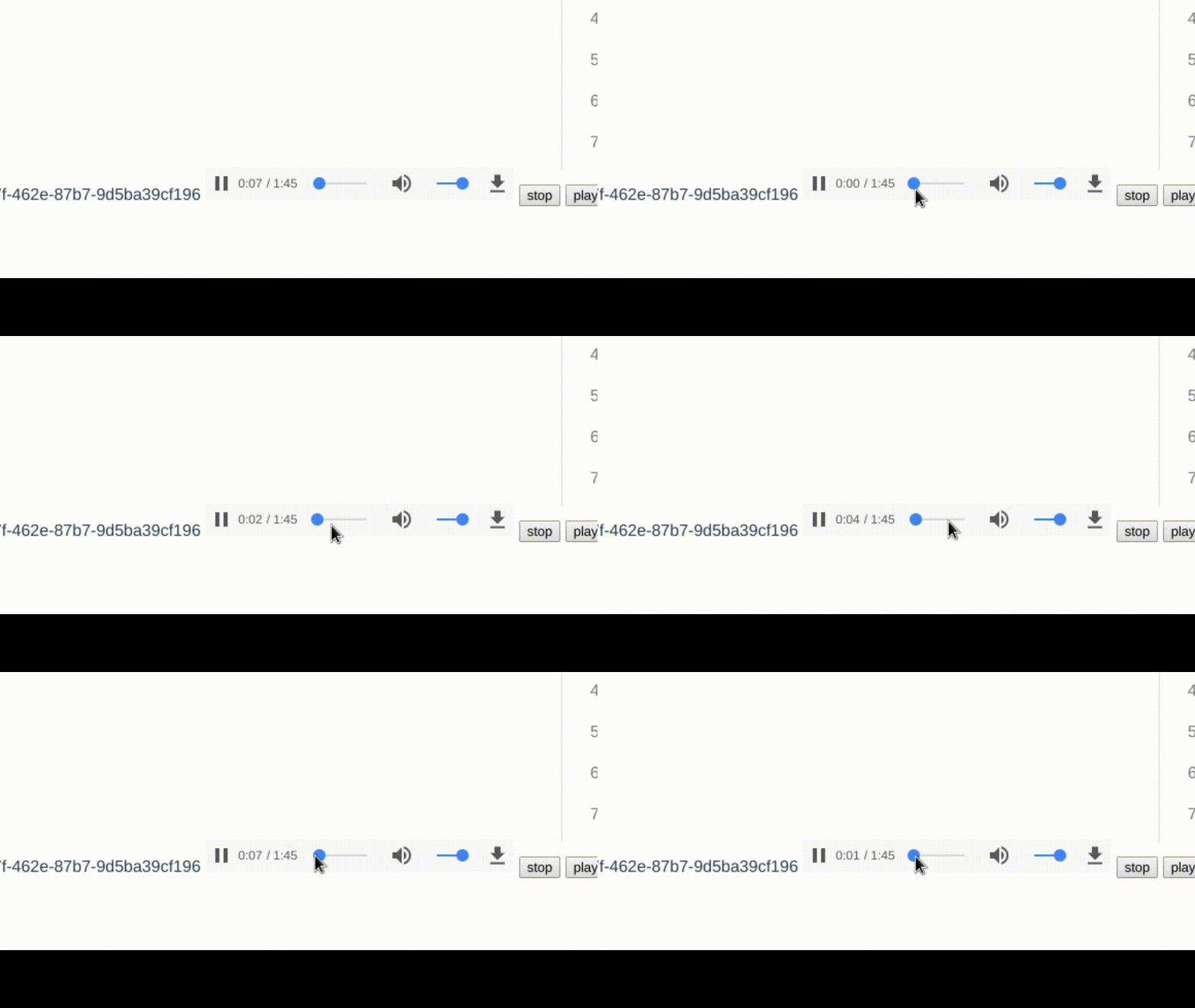
Initially, the browser creates a first buffered region (numbered 0) which is enough to play the first few seconds. As the playback approaches the end of that region, a new part of the media file is automatically requested.<br />
If the user happens to seek the media to an unbuffered region, the browser creates a new buffered region starting at that point. This means that, to properly reflect the next buffered zone, our application has to now show the buffered region #1 in gray. Then, when the user rewinds back to a time inside the first buffered region, our 0th region gets reused. Note that the browser likes to rearrange these ranges in the background, so hardcoded values will definitely become an issue.<br />
Here is a simple JavaScript/VueJS snippet which finds the present buffered region and updates the "buffered but unplayed" region in our application.<br />
[code lang="javascript"]<br />
updateSeekBar() {<br />
      const currentTime = this.$refs.audiotag.currentTime;<br />
      const totalDuration = this.$refs.audiotag.duration;<br />
      const timeRangeLength = this.$refs.audiotag.buffered.length;<br />
      let currentBufferRange = 0;<br />
      for (let range = 0; range < timeRangeLength; range++) {<br />
             const rangeStartTime = this.$refs.audiotag.buffered.start(range);<br />
             const rangeEndTime = this.$refs.audiotag.buffered.end(range);<br />
             if (currentTime >= rangeStartTime &amp;&amp; currentTime < rangeEndTime) {<br />
                 currentBufferRange = range;<br />
         }<br />
      }<br />
      this.bufferedPercentage = (this.$refs.audiotag.buffered.end(currentBufferRange) - currentTime) / totalDuration * 100;<br />
    },<br />
[/code]</p>]]></content><author><name>{&quot;display_name&quot;=&gt;&quot;Kento A. Lauzon&quot;, &quot;login&quot;=&gt;&quot;ligature_bdxbpw&quot;, &quot;email&quot;=&gt;&quot;kento.lauzon@ligature.ca&quot;, &quot;url&quot;=&gt;&quot;&quot;}</name><email>kento.lauzon@ligature.ca</email></author><category term="Web Stuff" /><summary type="html"><![CDATA[The HTML audio element exposes multiple properties and methods which prove to be useful for making a reactive web music player. In addition to the usual play/pause controls, the tag has a&nbsp;currentTime, a&nbsp;duration, and a&nbsp;buffered&nbsp;attributes which can all be used to get the playing media state in real time using a bit of JavaScript code. currentTime&nbsp;and&nbsp;duration The&nbsp;currentTime and&nbsp;duration attributes are pretty straightforward.&nbsp;currentTime returns the playback position from the audio file start, in seconds, as a float. Similarly,&nbsp;duration is a float corresponding to the total media length. One can then simply convert to a more natural time format using a bit of formatting code. [code lang="javascript"] export function formatDuration(floatSeconds) { const durationMillis = floatSeconds * 1000; const timeInSeconds = Math.floor(durationMillis / 1000); const minutes = Math.floor(timeInSeconds / 60); const seconds = timeInSeconds - (minutes * 60); const formattedSeconds = seconds > 9 ? `${seconds}` : `0${seconds}`; return `${minutes}:${formattedSeconds}`; } [/code] buffered regions The HTML audio element internally uses multiple&nbsp;buffered regions, which live independently. Each buffered region start and stop times can be accessed using the following JavaScript lines. audioelement.buffered.start() audioelement.buffered.end() Initially, the browser creates a first buffered region (numbered 0) which is enough to play the first few seconds. As the playback approaches the end of that region, a new part of the media file is automatically requested. If the user happens to seek the media to an unbuffered region, the browser creates a new buffered region starting at that point. This means that, to properly reflect the next buffered zone, our application has to now show the buffered region #1 in gray. Then, when the user rewinds back to a time inside the first buffered region, our 0th region gets reused. Note that the browser likes to rearrange these ranges in the background, so hardcoded values will definitely become an issue. Here is a simple JavaScript/VueJS snippet which finds the present buffered region and updates the "buffered but unplayed" region in our application. [code lang="javascript"] updateSeekBar() { const currentTime = this.$refs.audiotag.currentTime; const totalDuration = this.$refs.audiotag.duration; const timeRangeLength = this.$refs.audiotag.buffered.length; let currentBufferRange = 0; for (let range = 0; range const rangeStartTime = this.$refs.audiotag.buffered.start(range); const rangeEndTime = this.$refs.audiotag.buffered.end(range); if (currentTime >= rangeStartTime &amp;&amp; currentTime currentBufferRange = range; } } this.bufferedPercentage = (this.$refs.audiotag.buffered.end(currentBufferRange) - currentTime) / totalDuration * 100; }, [/code]]]></summary></entry><entry><title type="html">Handling Partial Content Requests (HTTP 206) for audio streaming</title><link href="https://ligature.ca/web%20stuff/2018/05/28/handling-partial-content-requests-http-206-for-audio-streaming.html" rel="alternate" type="text/html" title="Handling Partial Content Requests (HTTP 206) for audio streaming" /><published>2018-05-28T18:42:08-05:00</published><updated>2018-05-28T18:42:08-05:00</updated><id>https://ligature.ca/web%20stuff/2018/05/28/handling-partial-content-requests-http-206-for-audio-streaming</id><content type="html" xml:base="https://ligature.ca/web%20stuff/2018/05/28/handling-partial-content-requests-http-206-for-audio-streaming.html"><![CDATA[<p><img class="wp-image-128 aligncenter" style="font-size: 1rem;" src="/wp-content/uploads/2018/05/slider.gif" alt="" width="480" height="270" />W<span style="font-size: 1rem;">eb content streaming requires sending partial files between a server and a client, most often a web browser. This is a strict requirement for controlling audio playback using an HTML audio tag. While a simple HTTP 200 response containing the whole file will work for most use cases, it will not allow proper playback control, as is to be expected of a respectable music streaming app.&nbsp;</span></p>
<h1>Request</h1>
<p><img class=" wp-image-129 alignright" src="/wp-content/uploads/2018/05/content-length.png" alt="" width="303" height="336" /><br />
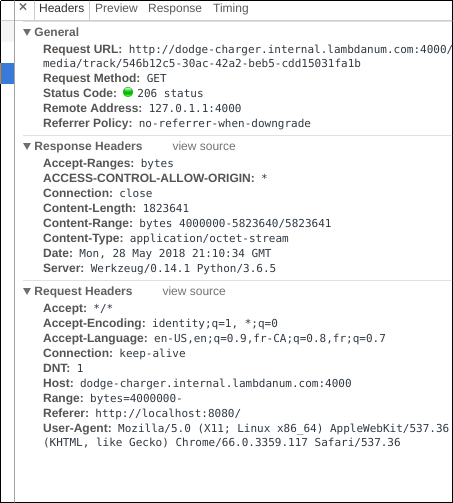
First, the browser requests a partial file by including the <code>Range</code>&nbsp;header, which encodes the position in bytes. The first word refers to the allowed range type, <code>bytes</code>&nbsp;in our case.<br />
<code>bytes=<start_offset>-<end_offset></code></p>
<h1>Response</h1>
<p>Next, the server should reply that :</p>
<ol>
<li>it accepts file ranges, using the <code>Accept-Ranges: bytes</code>&nbsp;header;</li>
<li>it is sending an incomplete file, using the <code>206</code>&nbsp;HTTP status code, containing a specific number of bytes with the <code>Content-Length</code>&nbsp;header;</li>
<li>and that it is sending the requested byte range, in the <code>Content-Range</code>&nbsp;header.</li>
</ol>
<p>The <code>Content-Range</code>&nbsp;header should contain the first byte index, the last, and the total file size.<br />
<code>Content-Range: bytes <start>-<end>/<total></code><br />
Note that the last fragment's "end" offset should be exactly one less than the total file size.</p>
<h1>Example</h1>
<p>Below is a quick and dirty example for sending a partial file in python.<br />
[code lang="python"]<br />
if request.headers['HTTP_RANGE']:<br />
  total_size = os.path.getsize(filename)<br />
  http_range = request.headers['HTTP_RANGE']<br />
  start = int(http_range.split("=")[1].split("-")[0])<br />
  end = start + 2000000 if http_range.split("-")[1] == '' else int(http_range.split("-")[1])<br />
  if end > total_size:<br />
      end = total_size - 1<br />
  with open(filename, 'rb') as f:<br />
    f.seek(start)<br />
    body = f.read(end - start)<br />
  return Response(206, {"Content-Type": "application/octet-stream",<br />
                        "Accept-Ranges": "bytes",<br />
                        "Content-Range": "bytes {}-{}/{}".format(start, end, total_size)},<br />
                  body)<br />
[/code]<br />
&nbsp;</p>]]></content><author><name>{&quot;display_name&quot;=&gt;&quot;Kento A. Lauzon&quot;, &quot;login&quot;=&gt;&quot;ligature_bdxbpw&quot;, &quot;email&quot;=&gt;&quot;kento.lauzon@ligature.ca&quot;, &quot;url&quot;=&gt;&quot;&quot;}</name><email>kento.lauzon@ligature.ca</email></author><category term="Web Stuff" /><summary type="html"><![CDATA[Web content streaming requires sending partial files between a server and a client, most often a web browser. This is a strict requirement for controlling audio playback using an HTML audio tag. While a simple HTTP 200 response containing the whole file will work for most use cases, it will not allow proper playback control, as is to be expected of a respectable music streaming app.&nbsp; Request First, the browser requests a partial file by including the Range&nbsp;header, which encodes the position in bytes. The first word refers to the allowed range type, bytes&nbsp;in our case. bytes=- Response Next, the server should reply that : it accepts file ranges, using the Accept-Ranges: bytes&nbsp;header; it is sending an incomplete file, using the 206&nbsp;HTTP status code, containing a specific number of bytes with the Content-Length&nbsp;header; and that it is sending the requested byte range, in the Content-Range&nbsp;header. The Content-Range&nbsp;header should contain the first byte index, the last, and the total file size. Content-Range: bytes -/ Note that the last fragment's "end" offset should be exactly one less than the total file size. Example Below is a quick and dirty example for sending a partial file in python. [code lang="python"] if request.headers['HTTP_RANGE']: total_size = os.path.getsize(filename) http_range = request.headers['HTTP_RANGE'] start = int(http_range.split("=")[1].split("-")[0]) end = start + 2000000 if http_range.split("-")[1] == '' else int(http_range.split("-")[1]) if end > total_size: end = total_size - 1 with open(filename, 'rb') as f: f.seek(start) body = f.read(end - start) return Response(206, {"Content-Type": "application/octet-stream", "Accept-Ranges": "bytes", "Content-Range": "bytes {}-{}/{}".format(start, end, total_size)}, body) [/code] &nbsp;]]></summary></entry><entry><title type="html">Making An SMS Chatbot #2 - Simple Natural Language Processing</title><link href="https://ligature.ca/sms%20chatbot/2018/01/10/making-an-sms-chatbot-2-simple-natural-language-processing.html" rel="alternate" type="text/html" title="Making An SMS Chatbot #2 - Simple Natural Language Processing" /><published>2018-01-10T10:44:39-06:00</published><updated>2018-01-10T10:44:39-06:00</updated><id>https://ligature.ca/sms%20chatbot/2018/01/10/making-an-sms-chatbot-2-simple-natural-language-processing</id><content type="html" xml:base="https://ligature.ca/sms%20chatbot/2018/01/10/making-an-sms-chatbot-2-simple-natural-language-processing.html"><![CDATA[<p>Now that we have a way of sending and receiving SMS messages, let's put it to use with some natural language processing!</p>
<h2>Tokenize and Stem</h2>
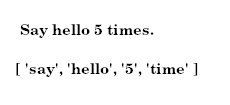
<p>The first step towards any sort of natural language processing is normalizing the input, as to make it easier to understand, or at the very least, manipulate. In our case, we want to split the input into words, and then remove any alteration, as to bring them back to their most simple form, or stem. That means removing plural signs and verb conjugations, amongst other things.&nbsp;For this, I used the Apache OpenNLP library.<img class="size-full wp-image-83 aligncenter" src="/wp-content/uploads/2018/01/tokenize.png" alt="" width="230" height="105" /></p>
<h2>Algorithm</h2>
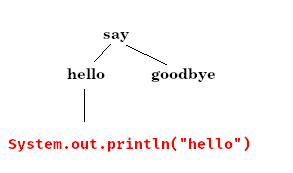
<p>Now that our input is "tokenized", it can be used to issue commands. To keep things simple, the chatbot will respond to commands with a predefined syntax. Possible commands will be registered with an&nbsp;<em>expected</em> word sequence, and will then be invoked when the corresponding sequence is received. When the program starts, a command tree is created, which can then be navigated, word by word, to find the associated method call.<br />
[caption id="attachment_87" align="aligncenter" width="293"]<img class="wp-image-87 size-full" src="/wp-content/uploads/2018/01/parseTree.png" alt="" width="293" height="173" /> The input message "Say hello." will cause a line to be printed to the console.[/caption]<br />
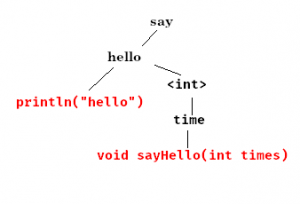
To allow for more variation, all extraneous words are ignored. For instance, "Keep <strong>say</strong>ing a very grateful <strong>hello</strong> forever." will resolve to the same method.</p>
<h2>Parameters</h2>
<p>The algorithm itself is quite simple, but can be expanded to make it a bit more powerful. For instance, passing parameters could be a nice addition. If those could be properly typed, that would be even better.<br />
<img class="size-medium wp-image-88 aligncenter" src="/wp-content/uploads/2018/01/parseTree2-300x204.png" alt="" width="300" height="204" /><br />
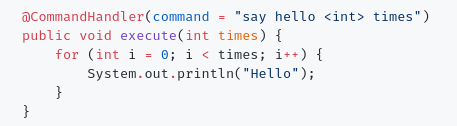
Using reserved keywords when registering a command, I can define parameters to be passed onto the invoked method. These keywords are user-defined, therefore completely customizable. At the moment, I have included most basic types, namely&nbsp;<em>Integer</em> and&nbsp;<em>String</em>, but in the future, one might see a command similar to "track package <UPS-tracking>", or even "what is $ <int> in <currency>?".<br />
Here is what a command declaration looks like in Java.<br />
<img class="aligncenter wp-image-89 size-full" src="/wp-content/uploads/2018/01/foo.png" alt="" width="457" height="126" /></p>
<h2>Handling User Identities</h2>
<p>Since all commands are tied to a phone number, we can use it to do some basic user authentication. In fact, it would be even nicer to have users belong into "groups", or "roles" which then determine the commands they are allowed to access. When a user invokes a forbidden command, it can simply be ignored.<br />
<img class="size-full wp-image-91 aligncenter" src="/wp-content/uploads/2018/01/foo-1.png" alt="" width="702" height="89" /><br />
Users are saved to a MySQL database, using Hibernate ORM.<br />
To make manipulating permissions easier, I added a&nbsp;<em>CommandContext</em> object which can be used in any command method to get contextual information, which includes the user information.</p>
<h2>"Conversational" Commands</h2>
<p><img class=" wp-image-92 alignright" src="/wp-content/uploads/2018/01/reminder.png" alt="" width="208" height="200" /><br />
Repeating several times in a row "Say hello 5 times" can become somewhat tedious. A "say that again" command could be useful.<br />
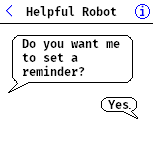
In fact, it would be great if our chatbot, like most modern assistants, had some contextual or&nbsp;<em>conversational</em> awareness. That way, we could define commands to be only accessible after a particular relevant command has been invoked. For instance, "Yes" and "No" commands could be enabled after a question, as part of the ongoing conversation.<br />
This is achieved by using a "@Conversational" annotation on the new command, which defines the method call after which it should be enabled. Then, when a new message is received, the conversational commands are checked first for a match. This can be used as an effective way of "masking" default commands depending on the context.</p>
<h2>Further Improvement</h2>
<p>As-is, the bot "works", but does not have any useful functionality. You can say "hello" to introduce yourself, which will create a new user in the database. It can remember names too, which could theoretically be used to customize messages. There are, however, several issues which should be addressed before going further.</p>
<ul>
<li>The database access is NOT thread-safe. The bot works, as long as there is only one concurrent user.</li>
<li>The actual command tree-searching methods are getting quite complicated. The class itself could definitely be more finely divided to improve readability.</li>
<li>The goal is to, someday, listen on multiple communication endpoints. For instance, the bot could be used as a&nbsp;<em>Skype</em> or&nbsp;<em>Messenger</em> bot. This should definitely be feasible in its current implementation. We could probably go a step further, and use a proper SMS service, instead of one I hacked together using a spare iPhone 3GS.</li>
<li>Right now, defining synonyms, or aliases for commands is quite clunky. It requires creating a brand new method, with its own&nbsp;<em>@CommandHandler</em> annotation. Allowing arrays or some other way to define aliases would be very useful. The same can be said of&nbsp;<em>conversational</em> commands.</li>
<li>The bot needs a friendly name!</li>
</ul>
<p><em>See on <a href="https://github.com/keotl/smsChatbot">GitHub</a>.</em></p>]]></content><author><name>{&quot;display_name&quot;=&gt;&quot;Kento A. Lauzon&quot;, &quot;login&quot;=&gt;&quot;ligature_bdxbpw&quot;, &quot;email&quot;=&gt;&quot;kento.lauzon@ligature.ca&quot;, &quot;url&quot;=&gt;&quot;&quot;}</name><email>kento.lauzon@ligature.ca</email></author><category term="SMS Chatbot" /><summary type="html"><![CDATA[Now that we have a way of sending and receiving SMS messages, let's put it to use with some natural language processing! Tokenize and Stem The first step towards any sort of natural language processing is normalizing the input, as to make it easier to understand, or at the very least, manipulate. In our case, we want to split the input into words, and then remove any alteration, as to bring them back to their most simple form, or stem. That means removing plural signs and verb conjugations, amongst other things.&nbsp;For this, I used the Apache OpenNLP library. Algorithm Now that our input is "tokenized", it can be used to issue commands. To keep things simple, the chatbot will respond to commands with a predefined syntax. Possible commands will be registered with an&nbsp;expected word sequence, and will then be invoked when the corresponding sequence is received. When the program starts, a command tree is created, which can then be navigated, word by word, to find the associated method call. [caption id="attachment_87" align="aligncenter" width="293"] The input message "Say hello." will cause a line to be printed to the console.[/caption] To allow for more variation, all extraneous words are ignored. For instance, "Keep saying a very grateful hello forever." will resolve to the same method. Parameters The algorithm itself is quite simple, but can be expanded to make it a bit more powerful. For instance, passing parameters could be a nice addition. If those could be properly typed, that would be even better. Using reserved keywords when registering a command, I can define parameters to be passed onto the invoked method. These keywords are user-defined, therefore completely customizable. At the moment, I have included most basic types, namely&nbsp;Integer and&nbsp;String, but in the future, one might see a command similar to "track package ", or even "what is $ in ?". Here is what a command declaration looks like in Java. Handling User Identities Since all commands are tied to a phone number, we can use it to do some basic user authentication. In fact, it would be even nicer to have users belong into "groups", or "roles" which then determine the commands they are allowed to access. When a user invokes a forbidden command, it can simply be ignored. Users are saved to a MySQL database, using Hibernate ORM. To make manipulating permissions easier, I added a&nbsp;CommandContext object which can be used in any command method to get contextual information, which includes the user information. "Conversational" Commands Repeating several times in a row "Say hello 5 times" can become somewhat tedious. A "say that again" command could be useful. In fact, it would be great if our chatbot, like most modern assistants, had some contextual or&nbsp;conversational awareness. That way, we could define commands to be only accessible after a particular relevant command has been invoked. For instance, "Yes" and "No" commands could be enabled after a question, as part of the ongoing conversation. This is achieved by using a "@Conversational" annotation on the new command, which defines the method call after which it should be enabled. Then, when a new message is received, the conversational commands are checked first for a match. This can be used as an effective way of "masking" default commands depending on the context. Further Improvement As-is, the bot "works", but does not have any useful functionality. You can say "hello" to introduce yourself, which will create a new user in the database. It can remember names too, which could theoretically be used to customize messages. There are, however, several issues which should be addressed before going further. The database access is NOT thread-safe. The bot works, as long as there is only one concurrent user. The actual command tree-searching methods are getting quite complicated. The class itself could definitely be more finely divided to improve readability. The goal is to, someday, listen on multiple communication endpoints. For instance, the bot could be used as a&nbsp;Skype or&nbsp;Messenger bot. This should definitely be feasible in its current implementation. We could probably go a step further, and use a proper SMS service, instead of one I hacked together using a spare iPhone 3GS. Right now, defining synonyms, or aliases for commands is quite clunky. It requires creating a brand new method, with its own&nbsp;@CommandHandler annotation. Allowing arrays or some other way to define aliases would be very useful. The same can be said of&nbsp;conversational commands. The bot needs a friendly name! See on GitHub.]]></summary></entry><entry><title type="html">Minecraft Discs : Dynamically-loaded Custom Music Discs From YouTube Videos</title><link href="https://ligature.ca/uncategorized/2018/01/04/minecraft-discs-dynamically-loaded-custom-music-discs-from-youtube-videos.html" rel="alternate" type="text/html" title="Minecraft Discs : Dynamically-loaded Custom Music Discs From YouTube Videos" /><published>2018-01-04T15:30:51-06:00</published><updated>2018-01-04T15:30:51-06:00</updated><id>https://ligature.ca/uncategorized/2018/01/04/minecraft-discs-dynamically-loaded-custom-music-discs-from-youtube-videos</id><content type="html" xml:base="https://ligature.ca/uncategorized/2018/01/04/minecraft-discs-dynamically-loaded-custom-music-discs-from-youtube-videos.html"><![CDATA[<p><em>As usual, the code is on&nbsp;<a href="https://github.com/keotl/mcdisc">GitHub.</a></em><br />
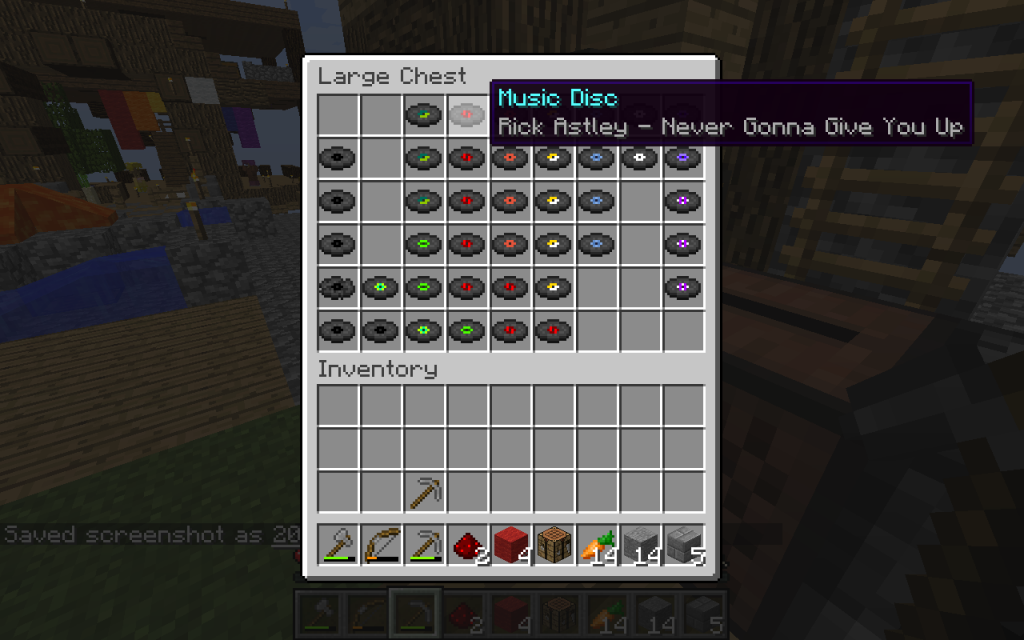
<img class="wp-image-76 alignright" style="font-size: 1rem;" src="/wp-content/uploads/2018/01/mcdisc-264x300.png" alt="" width="195" height="221" /><br />
A while ago, I had the idea of a simple Minecraft mod which would allow the creation of custom music discs in Minecraft using YouTube as the primary way of distributing and synchronizing the actual music tracks amongst players. All of this, while allowing any player on the server to add their own favorite music tracks.</p>
<h2>The Forge</h2>
<p>The actual Minecraft mod is quite simple. It reads a simple JSON-formatted list of tracks, and register them as items with Forge Mod Loader, giving them a game ID. At the same time, they get an item texture assigned, which is simply one of the existing record item textures.</p>
<h2>Building Resources</h2>
<p>To get the music tracks to play, the mod uses a separate resource pack, built by grabbing YouTube videos, and extracting the audio using ffmpeg. I made a simple java program to parse the JSON track list and download the tracks, while creating the required directory structure for a Minecraft resource pack. At this step, track titles also get added into the game.</p>
<h2>Keeping Clients Coherent</h2>
<p>Since the primary use case of this mod is multiplayer gameplay, we needed a way of keeping clients coherent, while still allowing a frequent additions. I came up with a simple CRUD-style application hosted on a Heroku container, which would serve a properly formatted track list, and offer a simple form for user to add new songs, all of that using a free-tier database. The only downside to this approach is that the container shuts itself off after 30 minutes of inactivity, then requiring roughly 25 seconds to serve the next request. This causes the game client to&nbsp;<em>freeze</em> in the loading screen, while waiting for a reply. This could be easily fixed by stepping to a more premium usage tier, but the very light usage mostly makes this a non-issue.<br />
<img class="aligncenter wp-image-77 size-large" src="/wp-content/uploads/2018/01/2018-01-04_16.37.00-1024x640.png" alt="" width="739" height="462" /></p>]]></content><author><name>{&quot;display_name&quot;=&gt;&quot;Kento A. Lauzon&quot;, &quot;login&quot;=&gt;&quot;ligature_bdxbpw&quot;, &quot;email&quot;=&gt;&quot;kento.lauzon@ligature.ca&quot;, &quot;url&quot;=&gt;&quot;&quot;}</name><email>kento.lauzon@ligature.ca</email></author><category term="Uncategorized" /><summary type="html"><![CDATA[As usual, the code is on&nbsp;GitHub. A while ago, I had the idea of a simple Minecraft mod which would allow the creation of custom music discs in Minecraft using YouTube as the primary way of distributing and synchronizing the actual music tracks amongst players. All of this, while allowing any player on the server to add their own favorite music tracks. The Forge The actual Minecraft mod is quite simple. It reads a simple JSON-formatted list of tracks, and register them as items with Forge Mod Loader, giving them a game ID. At the same time, they get an item texture assigned, which is simply one of the existing record item textures. Building Resources To get the music tracks to play, the mod uses a separate resource pack, built by grabbing YouTube videos, and extracting the audio using ffmpeg. I made a simple java program to parse the JSON track list and download the tracks, while creating the required directory structure for a Minecraft resource pack. At this step, track titles also get added into the game. Keeping Clients Coherent Since the primary use case of this mod is multiplayer gameplay, we needed a way of keeping clients coherent, while still allowing a frequent additions. I came up with a simple CRUD-style application hosted on a Heroku container, which would serve a properly formatted track list, and offer a simple form for user to add new songs, all of that using a free-tier database. The only downside to this approach is that the container shuts itself off after 30 minutes of inactivity, then requiring roughly 25 seconds to serve the next request. This causes the game client to&nbsp;freeze in the loading screen, while waiting for a reply. This could be easily fixed by stepping to a more premium usage tier, but the very light usage mostly makes this a non-issue.]]></summary></entry><entry><title type="html">Making an SMS Chatbot #1 - Exposing a REST API on an iPhone 3GS for sending and receiving SMS</title><link href="https://ligature.ca/sms%20chatbot/2018/01/01/exposing-a-rest-api-on-an-iphone-3gs-for-sending-and-receiving-sms.html" rel="alternate" type="text/html" title="Making an SMS Chatbot #1 - Exposing a REST API on an iPhone 3GS for sending and receiving SMS" /><published>2018-01-01T16:10:24-06:00</published><updated>2018-01-01T16:10:24-06:00</updated><id>https://ligature.ca/sms%20chatbot/2018/01/01/exposing-a-rest-api-on-an-iphone-3gs-for-sending-and-receiving-sms</id><content type="html" xml:base="https://ligature.ca/sms%20chatbot/2018/01/01/exposing-a-rest-api-on-an-iphone-3gs-for-sending-and-receiving-sms.html"><![CDATA[<p>This is a fun little project I started while toying around with a spare iPhone. All mentioned code can be found on my <a href="https://github.com/KEOTL/smsChatbot/tree/master/sms-line"><em>GitHub</em></a>.</p>
<h2>Setup</h2>
<p><img class="size-medium wp-image-66 alignright" src="/wp-content/uploads/2018/01/IMG_0327-225x300.png" alt="" width="225" height="300" /><br />
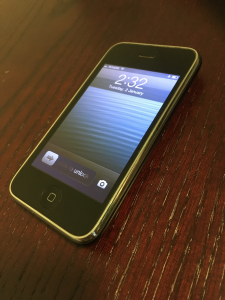
For this project, I will be using a jailbroken iPhone 3GS running iOS 6.1.6, the latest it can handle. The nice thing about these older devices is that they can be easily restored to any compatible iOS version, without any trouble. Jailbreaking then allows us to&nbsp;get really creative with the software running on the machine. I used the&nbsp;<em>redsn0w</em> jailbreak for the new-bootrom iPhone 3GS, with the <em>p0sixspwn</em> package to make it an untethered jailbreak.</p>
<h2>Going Online</h2>
<p>The most important part of a web API is, quite obviously, the&nbsp;<em>web</em> part. For this purpose, I used the&nbsp;<em>ios-webstack.tk</em> Cydia repository which provides a "one-tap solution" for installing a complete WebStack on a jailbroken iOS device. The repository actually contains multiple network service packages, such as an SMTP server, and a fully-fledged WordPress installation. The part we're more interested in, however, is the <em>ios-lighttpd-php-mysql</em> package, which installs, amongst other things, an HTTP daemon and a convenient preferences panel in the settings app to enable or disable the service.<br />
I configured httpd to execute CGI scripts, and set a filetype association for .sh and .py scripts to their respective interpreters. That way, when the server gets a request for a python file, it will instead execute it and return the console output as a raw HTTP response. This will allow us to make quick and dirty scripts for running on the very resource-limited hardware that we have.</p>
<h2>Sending Messages</h2>
<p>For sending out SMS messages, I could not find any built-in or third-party options that were dedicated to operating the messaging app from the command line. That said, I did find a quite obscure and undocumented use for the&nbsp;<em>biteSMS</em> app that will allows me to send messages from a shell script. The app itself is riddled with ads, but luckily we won't be using its GUI. Once installed, we can call it from a shell prompt to send a text message!</p>
<pre>/Applications/biteSMS.app/biteSMS -send -carrier 1234567890 <my message here></pre>
<h2>&nbsp;Receiving Incoming Transmissions</h2>
<p>Now comes the fun part. Ideally, we would like a way of triggering an action whenever an SMS is received. In the best-case scenario, we would be calling a shell script directly. Worst-case, we would end up catching some UI notification, which would be somewhat impractical, be we could work with that.<br />
I looked into <em>Activator</em> triggers for incoming messages, sadly the triggering action was not as reliable as I would have liked. The iPhone ended up missing many text messages, or only triggering when multiple unread messages had started piling up. In the process however, I did find ways of triggering UI system functions, like capturing a screen shot, from the command line, which is nice, but not technically useful for the task at hand.</p>
<h2>&nbsp;How the iPhone stores messages</h2>
<p>While digging around, I stumbled upon the internal SMS database, which is simply an sqlite3 database. The .db file itself is located in /var/mobile/Library/SMS/sms.db. In there, we find a "chat" table containing the conversation metadata, and a "message" table, which contains the actual text messages. It is then a matter of writing an SQL query to grab that data.</p>
<pre>SELECT m.rowid, c.chat_identifier,m.is_from_me,m.date,m.text FROM message m INNER JOIN chat_message_join cmj ON cmj.message_id=m.rowid INNER JOIN chat c ON cmj.chat_id=c.rowid WHERE cmj.message_id=:id</pre>
<p>To trigger an action when a message is received, I wrote a little background script which polls the database every second, checking whether a new entry has been created by looking at the highest id assigned. When a change is detected, the script makes an HTTP request to my computer, which runs the backend software.<br />
The iPhone, like OS X, uses the&nbsp;<em>plist</em> format with&nbsp;<em>launchd</em>&nbsp;to control system services. The syntax is somewhat more esoteric than the more common&nbsp;<em>systemd</em>, but it gets the job done anyway. The service files are located under /Library/LaunchDaemons, and can be enabled using <em>launchctl</em>.</p>
<h2>Other comments</h2>
<ul>
<li>To prevent the iPhone from turning off its Wi-Fi connection after going to sleep, I used the&nbsp;<em>Insomnia</em> Cydia tweak.</li>
<li>Instead of going through the process of installing a recent python version, which would have included proper JSON serialization support, I formatted the HTTP response manually by concatenating various parts of the SMS data. Using proper JSON formatting would definitely be better, especially in the long run, but I did not really want to go through the trouble of installing multiple python versions on the iPhone.</li>
</ul>
<p>I now have a way of sending and receiving SMS by sending a few JSON-formatted requests. That should definitely come in handy later...</p>]]></content><author><name>{&quot;display_name&quot;=&gt;&quot;Kento A. Lauzon&quot;, &quot;login&quot;=&gt;&quot;ligature_bdxbpw&quot;, &quot;email&quot;=&gt;&quot;kento.lauzon@ligature.ca&quot;, &quot;url&quot;=&gt;&quot;&quot;}</name><email>kento.lauzon@ligature.ca</email></author><category term="SMS Chatbot" /><summary type="html"><![CDATA[This is a fun little project I started while toying around with a spare iPhone. All mentioned code can be found on my GitHub. Setup For this project, I will be using a jailbroken iPhone 3GS running iOS 6.1.6, the latest it can handle. The nice thing about these older devices is that they can be easily restored to any compatible iOS version, without any trouble. Jailbreaking then allows us to&nbsp;get really creative with the software running on the machine. I used the&nbsp;redsn0w jailbreak for the new-bootrom iPhone 3GS, with the p0sixspwn package to make it an untethered jailbreak. Going Online The most important part of a web API is, quite obviously, the&nbsp;web part. For this purpose, I used the&nbsp;ios-webstack.tk Cydia repository which provides a "one-tap solution" for installing a complete WebStack on a jailbroken iOS device. The repository actually contains multiple network service packages, such as an SMTP server, and a fully-fledged WordPress installation. The part we're more interested in, however, is the ios-lighttpd-php-mysql package, which installs, amongst other things, an HTTP daemon and a convenient preferences panel in the settings app to enable or disable the service. I configured httpd to execute CGI scripts, and set a filetype association for .sh and .py scripts to their respective interpreters. That way, when the server gets a request for a python file, it will instead execute it and return the console output as a raw HTTP response. This will allow us to make quick and dirty scripts for running on the very resource-limited hardware that we have. Sending Messages For sending out SMS messages, I could not find any built-in or third-party options that were dedicated to operating the messaging app from the command line. That said, I did find a quite obscure and undocumented use for the&nbsp;biteSMS app that will allows me to send messages from a shell script. The app itself is riddled with ads, but luckily we won't be using its GUI. Once installed, we can call it from a shell prompt to send a text message! /Applications/biteSMS.app/biteSMS -send -carrier 1234567890 &nbsp;Receiving Incoming Transmissions Now comes the fun part. Ideally, we would like a way of triggering an action whenever an SMS is received. In the best-case scenario, we would be calling a shell script directly. Worst-case, we would end up catching some UI notification, which would be somewhat impractical, be we could work with that. I looked into Activator triggers for incoming messages, sadly the triggering action was not as reliable as I would have liked. The iPhone ended up missing many text messages, or only triggering when multiple unread messages had started piling up. In the process however, I did find ways of triggering UI system functions, like capturing a screen shot, from the command line, which is nice, but not technically useful for the task at hand. &nbsp;How the iPhone stores messages While digging around, I stumbled upon the internal SMS database, which is simply an sqlite3 database. The .db file itself is located in /var/mobile/Library/SMS/sms.db. In there, we find a "chat" table containing the conversation metadata, and a "message" table, which contains the actual text messages. It is then a matter of writing an SQL query to grab that data. SELECT m.rowid, c.chat_identifier,m.is_from_me,m.date,m.text FROM message m INNER JOIN chat_message_join cmj ON cmj.message_id=m.rowid INNER JOIN chat c ON cmj.chat_id=c.rowid WHERE cmj.message_id=:id To trigger an action when a message is received, I wrote a little background script which polls the database every second, checking whether a new entry has been created by looking at the highest id assigned. When a change is detected, the script makes an HTTP request to my computer, which runs the backend software. The iPhone, like OS X, uses the&nbsp;plist format with&nbsp;launchd&nbsp;to control system services. The syntax is somewhat more esoteric than the more common&nbsp;systemd, but it gets the job done anyway. The service files are located under /Library/LaunchDaemons, and can be enabled using launchctl. Other comments To prevent the iPhone from turning off its Wi-Fi connection after going to sleep, I used the&nbsp;Insomnia Cydia tweak. Instead of going through the process of installing a recent python version, which would have included proper JSON serialization support, I formatted the HTTP response manually by concatenating various parts of the SMS data. Using proper JSON formatting would definitely be better, especially in the long run, but I did not really want to go through the trouble of installing multiple python versions on the iPhone. I now have a way of sending and receiving SMS by sending a few JSON-formatted requests. That should definitely come in handy later...]]></summary></entry><entry><title type="html">Retro Mac Adventures #2 - Linux on the ‘06-‘07 MacBook</title><link href="https://ligature.ca/retro%20mac%20adventures/2017/12/02/retro-mac-adventures-linux-on-the-06-07-macbook.html" rel="alternate" type="text/html" title="Retro Mac Adventures #2 - Linux on the ‘06-‘07 MacBook" /><published>2017-12-02T13:12:00-06:00</published><updated>2017-12-02T13:12:00-06:00</updated><id>https://ligature.ca/retro%20mac%20adventures/2017/12/02/retro-mac-adventures-linux-on-the-06-07-macbook</id><content type="html" xml:base="https://ligature.ca/retro%20mac%20adventures/2017/12/02/retro-mac-adventures-linux-on-the-06-07-macbook.html"><![CDATA[<p>Last time, I was able to get up and running hardware-wise. Next, I will be installing a Linux distribution to get modern software on the device. I will be using the 64-bit version of Ubuntu 16.04 LTS which should run just fine on the new Core 2 Duo board.</p>
<h2>Boot Hurdles</h2>
<p>Early Intel Macs usually do not play nicely with third party operating systems. Even though the CPU itself is 64-bit capable, the EFI boot subsystem requires 32-bit binaries. As-is, bringing up the boot-selection menu using the option key will show the Ubuntu installation disc labelled "Windows". Selecting it, however, will hang the system. Using an external USB hard drive or thumb drive yields similarly unsatisfactory results. Those computers will only boot OS X from a USB device.</p>
<h2>Installing rEFInd</h2>
<p><img class=" wp-image-42 alignright" style="font-size: 1rem;" src="/wp-content/uploads/2017/11/IMG_0271-300x225.jpg" alt="" width="286" height="214" /><br />
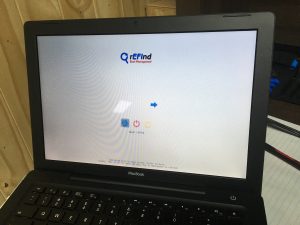
Using an external OS X installation, setting up the rEFInd Boo<span style="font-size: 1rem;">t Manager first will make it easier later on when we are getting to a bootable state. rEFInd provides a nice dynamic boot menu, which detects bootable media from all connected devices, regardless of the OS. Sadly, at least on early iterations of the MacBook line, the Ubuntu installer cannot be started directly this way, which I found out in the process.</span></p>
<h2>Getting "Creative" with the Installation Process</h2>
<p>Even though the Mac stubbornly refuses to boot the installation media, I will not be defeated! Let's list our options :</p>
<ul>
<li>Use 32-bit Ubuntu;</li>
<li>Look for another Linux distro, hopefully one which boots correctly on the Mac;</li>
<li>Give up and write a blog post about it.</li>
</ul>
<p>The first option seems like a nice tradeoff... at first glance, that is. I know for a fact that it simply works, having tried it before. However, many modern softwares are dropping 32-bit support (*cough* chrome *cough*), and many things simply feel slower. At this point, we have set out on a quest to install 64-bit Ubuntu, and settling for anything less would just feel like laziness, thereby leaving me with a taste of defeat and overall disappointment.</p>
<h2>On the Surface</h2>
<p>[caption id="attachment_46" align="alignright" width="300"]<img class="wp-image-46 size-medium" style="font-size: 1rem;" src="/wp-content/uploads/2017/11/IMG_0269-300x225.jpg" alt="" width="300" height="225" /> Everything wrong with DongleScape in a single picture.[/caption]<br />
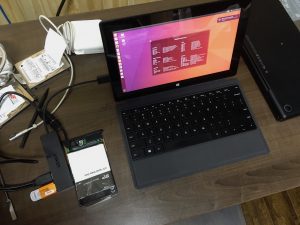
There is another way however. Come closer, as I tell ye the tale of external installation. What I ended up doing the first time I tried installing Linux on a MacBook, was to connect its hard drive to a working host system, and performing a "chrooted" installation using an arch linux bootable media. However, unlike Arch Linux, Ubuntu has a nice bootable graphical installer which sounds easier than a console installation. (At that time anyway...) So, using the graphical installer, on a Surface Pro 1 I had lying around, I was able to install the OS directly on the SSD, while incurring a still manageable mess of wires.</p>
<blockquote><p><em>DongleScape&nbsp;<span class="first-slash">\</span>&nbsp;<span class="pr"><span class="mw">ˈd&auml;ŋ-gəl-ˌskāp</span>&nbsp;</span><span class="last-slash">\, noun. The adventure of using an immature connector standard. Its adepts can be recognized by the unearthly amount of adapters in their bags. Most fervent followers will carry more than required for their needs, as an exercise&nbsp;of self-discipline, part of their ascetic lifestyle.</span><br />
</em></p></blockquote>
<p>&nbsp;</p>
<h2>Getting it to Work</h2>
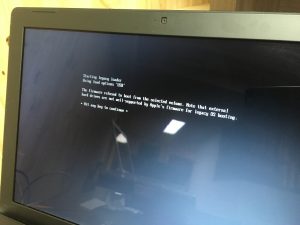
<p>[caption id="attachment_53" align="alignright" width="300"]<img class="wp-image-53 size-medium" style="font-size: 1rem;" src="/wp-content/uploads/2017/11/IMG_0270-300x225.jpg" alt="" width="300" height="225" /> rEFInd does not detect 64-bit EFI binaries[/caption]<br />
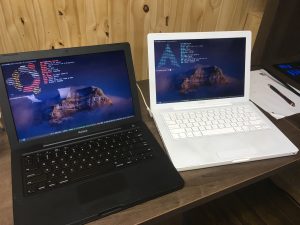
Installing from another computer usually causes its own lot of issues, which can range from mildly rage-inducing, to simply annoying. The Surface Pro 4, using a newer 64-bit EFI boot system, caused the wrong type of GRUB binaries to get installed on the drive. Using an existing installation on a similar MacBook, I was able to mount the freshly-installed Ubuntu and copy some 32-bit EFI binaries. While they were unsuitable for the actual drive, they still allowed me to boot to a GRUB rescue shell, from booting was possible. From there, I reinstalled GRUB, once again, to generate proper EFI stubs for the system.</p>
<h2>The End Result</h2>
<p><img class="size-medium wp-image-55 alignright" src="/wp-content/uploads/2017/11/IMG_0280-1-300x225.jpg" alt="" width="300" height="225" /><br />
This was probably an overcomplicated mess, but whatever, it works. The result is a nice, slick, black MacBook which is still usable in 2017.</p>]]></content><author><name>{&quot;display_name&quot;=&gt;&quot;Kento A. Lauzon&quot;, &quot;login&quot;=&gt;&quot;ligature_bdxbpw&quot;, &quot;email&quot;=&gt;&quot;kento.lauzon@ligature.ca&quot;, &quot;url&quot;=&gt;&quot;&quot;}</name><email>kento.lauzon@ligature.ca</email></author><category term="Retro Mac Adventures" /><summary type="html"><![CDATA[Last time, I was able to get up and running hardware-wise. Next, I will be installing a Linux distribution to get modern software on the device. I will be using the 64-bit version of Ubuntu 16.04 LTS which should run just fine on the new Core 2 Duo board. Boot Hurdles Early Intel Macs usually do not play nicely with third party operating systems. Even though the CPU itself is 64-bit capable, the EFI boot subsystem requires 32-bit binaries. As-is, bringing up the boot-selection menu using the option key will show the Ubuntu installation disc labelled "Windows". Selecting it, however, will hang the system. Using an external USB hard drive or thumb drive yields similarly unsatisfactory results. Those computers will only boot OS X from a USB device. Installing rEFInd Using an external OS X installation, setting up the rEFInd Boot Manager first will make it easier later on when we are getting to a bootable state. rEFInd provides a nice dynamic boot menu, which detects bootable media from all connected devices, regardless of the OS. Sadly, at least on early iterations of the MacBook line, the Ubuntu installer cannot be started directly this way, which I found out in the process. Getting "Creative" with the Installation Process Even though the Mac stubbornly refuses to boot the installation media, I will not be defeated! Let's list our options : Use 32-bit Ubuntu; Look for another Linux distro, hopefully one which boots correctly on the Mac; Give up and write a blog post about it. The first option seems like a nice tradeoff... at first glance, that is. I know for a fact that it simply works, having tried it before. However, many modern softwares are dropping 32-bit support (*cough* chrome *cough*), and many things simply feel slower. At this point, we have set out on a quest to install 64-bit Ubuntu, and settling for anything less would just feel like laziness, thereby leaving me with a taste of defeat and overall disappointment. On the Surface [caption id="attachment_46" align="alignright" width="300"] Everything wrong with DongleScape in a single picture.[/caption] There is another way however. Come closer, as I tell ye the tale of external installation. What I ended up doing the first time I tried installing Linux on a MacBook, was to connect its hard drive to a working host system, and performing a "chrooted" installation using an arch linux bootable media. However, unlike Arch Linux, Ubuntu has a nice bootable graphical installer which sounds easier than a console installation. (At that time anyway...) So, using the graphical installer, on a Surface Pro 1 I had lying around, I was able to install the OS directly on the SSD, while incurring a still manageable mess of wires. DongleScape&nbsp;\&nbsp;ˈd&auml;ŋ-gəl-ˌskāp&nbsp;\, noun. The adventure of using an immature connector standard. Its adepts can be recognized by the unearthly amount of adapters in their bags. Most fervent followers will carry more than required for their needs, as an exercise&nbsp;of self-discipline, part of their ascetic lifestyle. &nbsp; Getting it to Work [caption id="attachment_53" align="alignright" width="300"] rEFInd does not detect 64-bit EFI binaries[/caption] Installing from another computer usually causes its own lot of issues, which can range from mildly rage-inducing, to simply annoying. The Surface Pro 4, using a newer 64-bit EFI boot system, caused the wrong type of GRUB binaries to get installed on the drive. Using an existing installation on a similar MacBook, I was able to mount the freshly-installed Ubuntu and copy some 32-bit EFI binaries. While they were unsuitable for the actual drive, they still allowed me to boot to a GRUB rescue shell, from booting was possible. From there, I reinstalled GRUB, once again, to generate proper EFI stubs for the system. The End Result This was probably an overcomplicated mess, but whatever, it works. The result is a nice, slick, black MacBook which is still usable in 2017.]]></summary></entry></feed>